MikroTik Login with Active Directory Users via RADIUS (NPS)
1. NPS: add the router as a RADIUS client
NPS (Local) > RADIUS Clients and Servers > RADIUS Clients > right-click > New RADIUS Client.
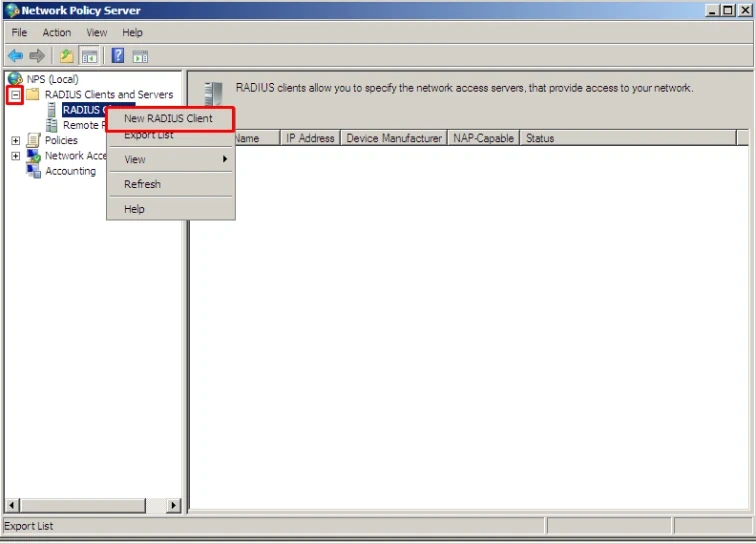
On the Settings tab:
- Enable this RADIUS client: ticked.
- Friendly name: e.g.
Mikrotik. - Address (IP or DNS): the MikroTik IP address.
- Shared secret: Manual, type it twice. You will use the same secret on the router.
2. NPS: connection request policy
This is the step most guides skip. Without it the login fails.
Policies > Connection Request Policies > right-click > New.
- Overview: policy name (e.g.
Mikrotik), Policy enabled ticked, Type of network access server: Unspecified. - Conditions: add NAS IPv4 Address with your routers, e.g.
^(192\.0\.2\.1|192\.0\.2\.4|198\.51\.100\.7)$. - Settings > Authentication Methods: tick Override network policy authentication settings and, under Less secure authentication methods, tick:
- Microsoft Encrypted Authentication version 2 (MS-CHAP-v2), plus User can change password after it has expired.
- Microsoft Encrypted Authentication (MS-CHAP), plus User can change password after it has expired.
- Leave CHAP, PAP and Allow clients to connect without negotiating an authentication method unticked.
3. NPS: network policy
Policies > Network Policies > right-click > New.
- Overview: policy name, Policy enabled ticked, Grant access, Type of network access server: Unspecified.
- Conditions: User Groups with the AD group of users allowed to log in to the routers.
- Constraints > Authentication Methods: the same MS-CHAP-v2 and MS-CHAP options as above.
- Settings > RADIUS Attributes > Standard: Framed-Protocol = PPP and Service-Type = Framed.
Leave the rest by default.
4. MikroTik: RADIUS server and AAA
RADIUS > Add: service login, the NPS address and the same secret.
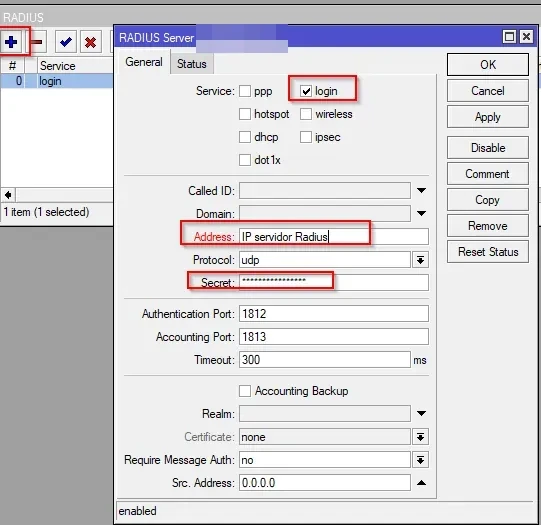
System > Users > AAA: tick Use RADIUS and choose the default group (here full).
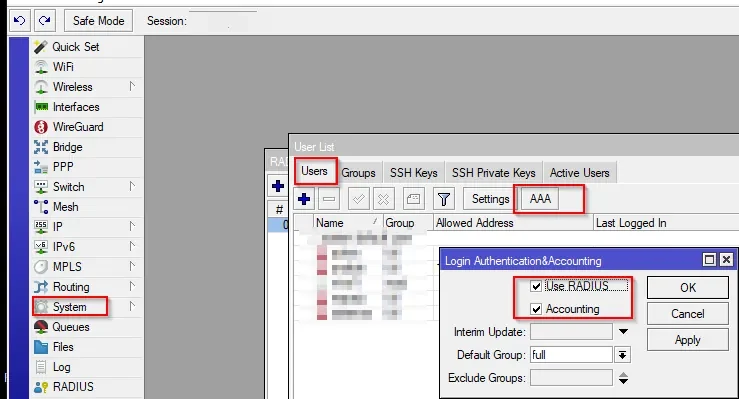
Same from the terminal:
/radius add service=login address=NPS_IP secret=SHARED_SECRET
/user aaa set use-radius=yes default-group=full
Tips: keep a local admin user as fallback if NPS is down. Troubleshoot with /log print where topics~"radius" on the router and the NPS events in Event Viewer.
Links: it4all, MUM presentation.
Related: MikroTik FastTrack.