MikroTik FastTrack: Speed Up Routing and Cut CPU Load
FastTrack lets established and related connections skip most of the firewall processing. Throughput goes up and CPU usage goes down, which is very noticeable on small routers.
You only need two rules in the forward chain, in this order:
- Connection state established, related with action fasttrack connection.
- Connection state established, related with action accept.
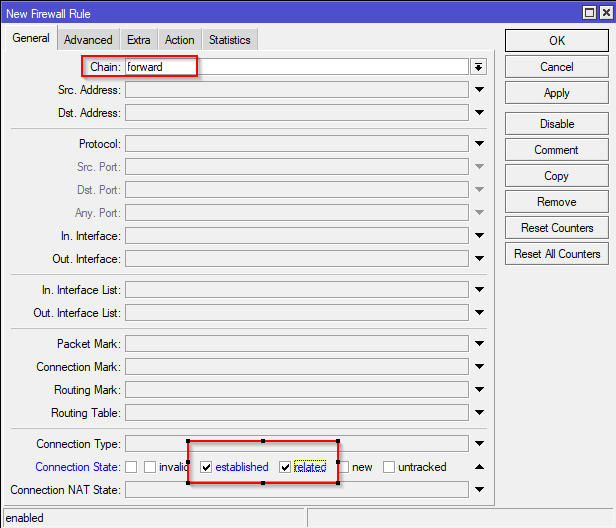
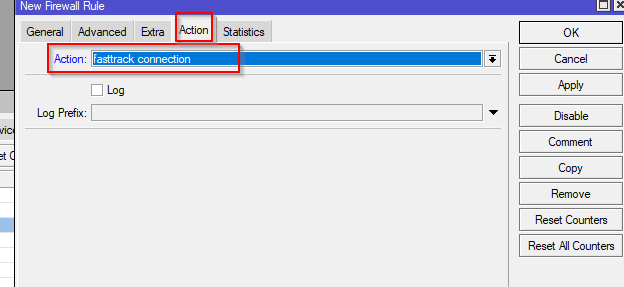
From the terminal:
/ip firewall filter
add chain=forward action=fasttrack-connection connection-state=established,related hw-offload=yes comment="FastTrack"
add chain=forward action=accept connection-state=established,related comment="Accept established,related"
hw-offload only exists in RouterOS v7. Remove it on v6.
Move both rules to the top of the forward chain. Check that traffic is being fasttracked with /ip firewall filter print stats.
Watch out: fasttracked packets skip queues (simple queues, queue trees), mangle and IPsec policies. If you rely on any of those, exclude that traffic or don't use FastTrack.
More info: MKController and Network Berg (video).
Related: MikroTik NAT actions explained.