Join Proxmox VE to Active Directory (Realm and User Sync)
1. Service account: create a normal domain user for the sync, for example proxmox. Read access is enough.
2. Add the realm: Datacenter > Permissions > Realms > Add > Active Directory Server. Fill in realm name, domain and server(s). Use LDAPS (port 636) if you can.
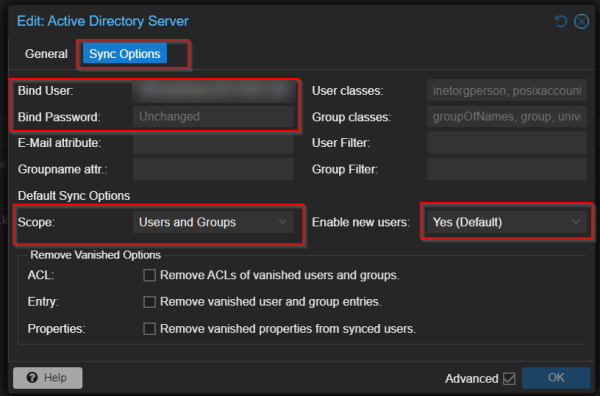
3. Sync options:
- Bind User: the distinguished name (DN) of the service account. Get it with:
dsquery user dc=yourdomain,dc=local -name proxmox
or Get-ADUser proxmox | Select-Object DistinguishedName.
- Bind Password: the account password.
- Scope: Users and Groups. Enable new users: Yes.
4. Sync: select the realm > Sync, or from the shell:
pveum realm sync YOURDOMAIN
For automatic sync, add a job in Datacenter > Realm Sync Jobs (Proxmox VE 8).
5. Permissions: synced users can't do anything yet. Go to Datacenter > Permissions > Add > Group Permission and give the AD group a role (for example PVEAdmin on /). Users log in choosing the AD realm.
Links: Proxmox forum, video, user and permission management.